
Introduction
You've just launched your online store. A customer finds a product they like, enters their card details, and clicks "Buy Now." Three seconds later, a confirmation appears. But where does that money actually go before it lands in your bank account?
For most first-time store owners, this question gets shelved in favor of more pressing concerns — choosing products, running ads, building the site. The payment infrastructure behind every sale directly affects your cash flow, your fees, and how fast you actually get paid.
Here's where the confusion starts: many new entrepreneurs treat "payment processor" and "merchant account" as the same thing. They're not. They play different roles in every transaction, and choosing the wrong setup — or misunderstanding how they interact — can cost you in unexpected fees or delayed payouts right when you need cash most.
This guide explains exactly what each one does, how they work together, and which setup fits your business — so you can get paid faster and avoid fees that quietly drain your margins.
Key Takeaways
- A payment processor authorizes and routes card transactions between the customer's bank and the merchant
- A merchant account temporarily holds sale funds before transferring them to your regular business bank account
- Both are required for every electronic payment your store accepts
- Most new e-commerce businesses use bundled payment facilitators (like Stripe or Square) that combine both into one platform
- Your transaction volume, industry type, and cash flow needs should drive which setup you choose
Payment Processor vs. Merchant Account: Quick Comparison
| Dimension | Payment Processor | Merchant Account |
|---|---|---|
| Primary Function | Authorizes and routes transactions between banks | Holds funds temporarily before transfer to business bank |
| What It Handles | Card authorization, fraud checks, network communication | Fund staging, settlement timing, chargeback management |
| Setup Complexity | Low to medium (simple with PayFac; more involved standalone) | Medium to high (requires underwriting and bank approval) |
| Fee Structure | Per-transaction percentage + fixed fee (e.g., 2.9% + $0.30) | Monthly maintenance fee + per-transaction fee + chargeback fees |
| Who Controls Fund Timing | Processor sets payout schedules | Acquiring bank controls holding periods and release |
In modern e-commerce, most entrepreneurs never set these up separately. Payment facilitators like Stripe and Square combine both into a single platform under one contract. That's why so many new store owners don't realize they're distinct systems at all.
What Is a Payment Processor?
A payment processor is the technical service that transmits transaction details securely among the merchant, card networks (Visa, Mastercard), and the customer's issuing bank. It acts as the traffic controller routing data between parties — making card payments possible in seconds.
The Three Core Functions
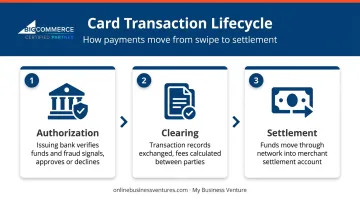
Every card transaction moves through three stages:
- Authorization — The processor sends card and purchase data to the issuing bank, which checks for available funds and fraud signals, then approves or declines. Approval reserves funds but doesn't finalize the transfer.
- Clearing — Transaction records are exchanged between parties, reconciled, and fees are calculated.
- Settlement — Funds move from the issuing bank through the network and into the merchant's settlement arrangement, then get paid out to the business bank account.
As Stripe explains, the processor supplies the messaging infrastructure, while the acquiring bank establishes the merchant relationship, enables network access, and handles financial settlement.
Standalone Processors vs. Payment Facilitators
There are two ways to access processing:
- Standalone processors require you to have your own merchant account and a separate acquiring bank relationship. More setup, but potentially more pricing control.
- Payment facilitators (PayFacs) like Stripe, Square, or PayPal bundle everything — processor, merchant account functionality, and gateway — under one platform. They enroll businesses as sub-merchants under a sponsoring acquirer (the bank behind the platform), removing the need for a direct bank relationship.
For new e-commerce stores, PayFacs are almost always the faster path.
What to Evaluate When Choosing a Processor
- Transaction fee model (flat-rate vs. interchange-plus)
- Supported payment methods (cards, digital wallets, international)
- Fraud prevention and chargeback tools
- Integration with your e-commerce platform
- Payout speed and first-payment hold periods
For entrepreneurs launching through a packaged e-commerce setup, many of these decisions are already made for you. My Business Venture's e-commerce packages, for example, include integrated payment processing through i3Verticals, LLC (a registered ISO/MSP of Merrick Bank) — so there's no need to source a processor independently. The fee structure is 2.19% + $0.20 per transaction plus a $15.95/month maintenance fee, configured as part of the store launch process.
What Is a Merchant Account?
A merchant account is a specialized settlement account — not a regular business checking account — that temporarily receives card proceeds before releasing them to your business bank. The acquiring bank that backs this account sponsors your access to card networks and takes on liability for disputed transactions.
The Underwriting Process
Opening a merchant account isn't instant. Acquiring banks review applications based on:
- Business registration documents and EIN/Tax ID
- Owner identity (government ID, SSN)
- Business bank statements and financial history
- Website, product details, and projected transaction volume
- Prior processing history (if available)
Approval timelines range from roughly one day to several weeks depending on documentation and business risk profile.
Standard vs. High-Risk Accounts
Not all merchants are treated equally. "High-risk" is an underwriting conclusion, not a fixed list. Common factors that trigger that label include:
- New businesses with no credit history
- Industries with elevated chargeback rates (travel, digital subscriptions, coaching)
- Large average ticket sizes
- Dependence on third-party fulfillment with long delivery windows
High-risk accounts typically face stricter requirements, higher fees, and rolling reserves — keep this in mind before applying, especially with a dropship model.
Typical Fee Ranges
Based on current published rates across major providers:
| Fee Type | Typical Range |
|---|---|
| Per-transaction (online flat rate) | 2.9% + $0.25 to 3.49% + $0.49 |
| Monthly maintenance | $0–$30/month |
| Setup/application | Often $0 |
| Chargeback/dispute fee | $15–$20 per incident |
These figures come from providers like Stripe, Chase, and Helcim — not a guaranteed industry standard. Before committing, request the full fee schedule: gateway, PCI compliance, cross-border, and early-termination fees can add up quickly.
How Payment Processors and Merchant Accounts Work Together
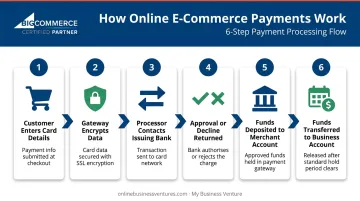
Here's the full transaction flow for an online purchase, step by step:
- Customer enters card details at checkout on your online store
- Payment gateway encrypts the data and passes it to the payment processor
- Processor contacts the issuing bank to request authorization
- Approval or decline is returned and relayed back to the checkout page in seconds
- Approved funds are deposited into the merchant account after clearing
- After a holding period (typically 1–3 business days), the processor transfers funds to the business bank account
The Gateway's Role
The payment gateway is the front-end technology layer — embedded in your checkout page — that securely collects and encrypts customer card data before handing it to the processor. Gateway, processor, and merchant account are technically three distinct components, though most modern platforms bundle all three.
Security at Every Stage
The multi-step process exists for good reason. Each layer carries its own security requirements:
- SSL/TLS encryption protects card data as it moves between your checkout page and the processor
- PCI DSS compliance applies at every stage — including to merchants using hosted checkout forms
- Script attack protections are now required: from April 2025, PCI SSC updated SAQ A eligibility rules to confirm checkout pages aren't vulnerable, even when using third-party payment forms
- Merchant account holding periods give processors time to catch fraudulent or disputed transactions before funds are released
That holding period is also what drives the payout delays you'll see in practice.
Cash Flow Reality Check
Payout timing varies by provider. Current published schedules:
- Square: 1–2 business days standard
- Stripe: 2 business days standard (but first payout is typically 7–14 days)
- PayPal: New seller payments can be held up to 21 days
For new entrepreneurs managing tight cash flow — especially in a dropship model where you pay the supplier after collecting customer payment — knowing your exact payout schedule before you launch can be the difference between a smooth start and a cash shortfall in week one.
Which Setup Is Right for Your Online Business?
The right choice depends on where you are in your business lifecycle.
Choose Based on Your Situation
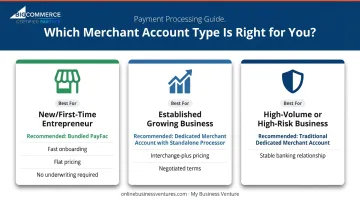
New or first-time e-commerce entrepreneur: Go with a bundled payment facilitator or an all-in-one platform. Faster automated onboarding, simpler flat pricing, and no separate bank underwriting. The per-transaction fees are slightly higher, but the tradeoff — speed and simplicity — is worth it at low volumes.
Established business with growing transaction volume: Consider a dedicated merchant account with a standalone processor offering interchange-plus pricing. More documentation and slower underwriting, but individualized pricing, negotiated terms, and better reporting.
High-volume or high-risk business: A traditional dedicated merchant account is typically the more stable path. PayFac platforms carry reserve and monitoring powers that can trigger account holds for high-risk profiles. A dedicated banking relationship lets you address those concerns upfront — before they become disruptions.
A Practical Checklist Before You Decide
Ask yourself:
- What is my expected monthly transaction volume?
- Do I need to accept international payments?
- How quickly do I need funds available after a sale?
- Am I in a standard or potentially high-risk industry?
- Do I have technical resources to integrate separate systems?
If your answers point toward simplicity and speed, MBV's turnkey e-commerce packages have the payment side built in from day one. Each package tier includes:
- Merchant account setup through i3Verticals/Merrick Bank
- A secure payment gateway with SSL-encrypted checkout
- Real-time fraud prevention with loss coverage
All three tiers — Enterprise ($3,995), Premier ($4,995), and Millennium ($5,995) — come with this infrastructure included. New store owners can start accepting payments within days, with no separate merchant account application required.
Frequently Asked Questions
How much does it cost to get a merchant account?
Expect per-transaction fees in the range of 2.9% + $0.25 to 3.49% + $0.49 for online payments, monthly maintenance fees from $0 to $30, and chargeback fees typically $15–$20 per incident. Setup is often $0 with major providers, though some charge application fees. Costs vary by provider and your business risk profile.
Can I use a merchant account for online payments?
Yes — merchant accounts are specifically designed to support electronic transactions, including e-commerce. A payment gateway connects your online checkout to the merchant account, encrypting customer data and routing it to the processor for authorization and settlement.
Do I need both a payment processor and a merchant account?
Technically yes, but you don't always have to set them up separately. Payment facilitators bundle both into one platform with a single contract, which is why most new e-commerce businesses never deal with them as separate components.
What is the difference between a payment processor and a payment gateway?
The gateway is the front-end technology that captures and encrypts customer card data at checkout. The processor is the back-end service that communicates with banks to authorize and settle the transaction. Both are required for online payments — and most platforms bundle them together.
Can a new or small business qualify for a merchant account?
Yes. You'll need basic documentation — business registration, EIN, and a business bank account — and you'll go through underwriting. Payment facilitators typically have faster, more automated approval processes, making them a practical starting point for businesses without established processing history.
What happens if a customer disputes a charge on my merchant account?
A chargeback is initiated: the customer's bank reverses the charge and debits your merchant account, plus a fee (typically $15–$20). You can dispute it by submitting evidence within a 7–21 day window. Fraud prevention tools built into most modern payment platforms can significantly reduce chargeback frequency.